Less wall of text. More useful answer.
Give your AI response a shape that works for you. One small instruction can make the differences much easier to see.
Your question is only half the prompt.
You ask an AI assistant to compare three tools. The answer arrives as several perfectly reasonable paragraphs. Now you have another job: reading them twice to find out which tool does what.
A small instruction can help: say what the answer should look like. When you name the columns of a table, each option has a place for the same information. You can scan down a column instead of hunting through paragraphs.
Think about the decision you want to make. Price might matter, but so might setup effort, offline access, or export options. Choose three useful questions and make them your column headings.
Make the comparison fair.
For a quick experiment, use these fictional notes: Cedar costs $5 a month, works offline, and has no shared editing. Orbit costs $8 a month, supports shared editing, and needs an internet connection. Finch is free, works offline, and only exports plain text.
Paste those notes before the instruction below. Supplying the facts yourself lets you focus on the skill: structuring information. Ask the assistant to use only your notes and mark missing information as unknown.
A table is useful when you’re comparing the same attributes across several options. If you want an explanation of why something happens, a paragraph may work better. Choose the format for the job.
Using only the notes above, compare Cedar, Orbit, and Finch in a table. Use columns for monthly price, collaboration, and one limitation. Keep each cell to one sentence. Write ‘unknown’ when the notes don’t say.
Same question. Better shape.
- Copy the fictional tool notes above into an AI assistant. Ask: ‘Compare these three tools.’
- Keep the notes and ask again, this time adding the table instruction.
- Find each tool’s limitation in both answers. Notice which version is easier to scan.
Which answer would you actually use to make a decision?
A little nudge
Keep the source notes the same in both attempts. Only change the instructions about the answer’s format.
What to look for
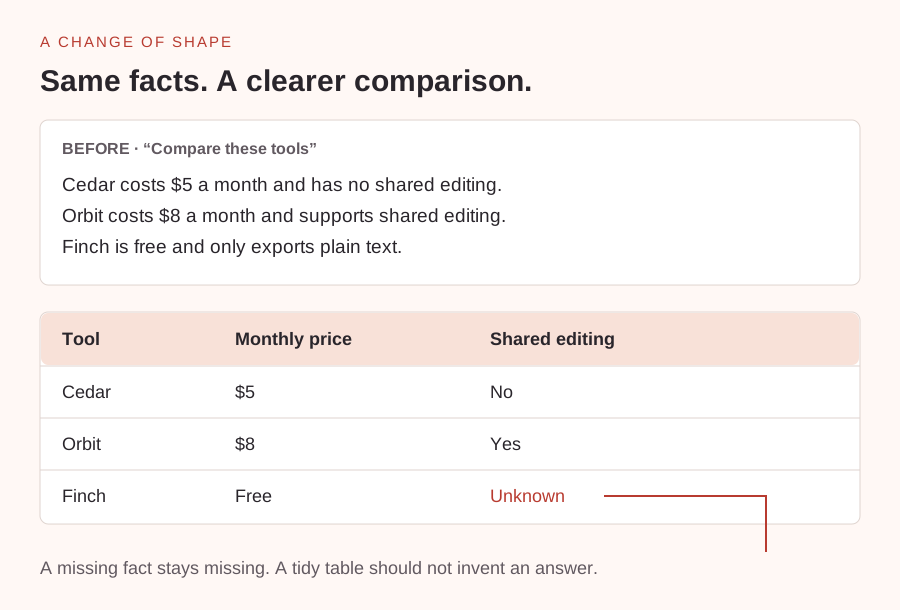
The table should preserve the $5, $8, and free prices. Orbit supports shared editing; Cedar does not. Finch’s collaboration support is unknown. A good answer leaves that gap visible instead of inventing a feature.
Take it one small step further
Replace the collaboration column with offline access. Notice how choosing a different column changes what stands out.
Tell the model what information matters—and where to put it.
Read more: OpenAI · Clear, specific prompts ↗
No submission needed. This one is just for you.