What comes after the question mark?
Read the small instructions tucked inside a web address—and understand what a shared link might remember.
There’s more to a link than a destination.
You search a website, choose a category, and sort the results. Sometimes those choices appear in the address bar. The page is the destination; the extra text records a few instructions for what to show there.
In the fictional address below, /search is the path. The question mark starts the query string. After it, topic=python is a name-value pair: the name is topic and the value is python. The ampersand separates that pair from sort=newest.
These names are chosen by the website. There is no universal rule that every site understands topic or sort. A server can use the values, browser code can use them, or a site can ignore them.
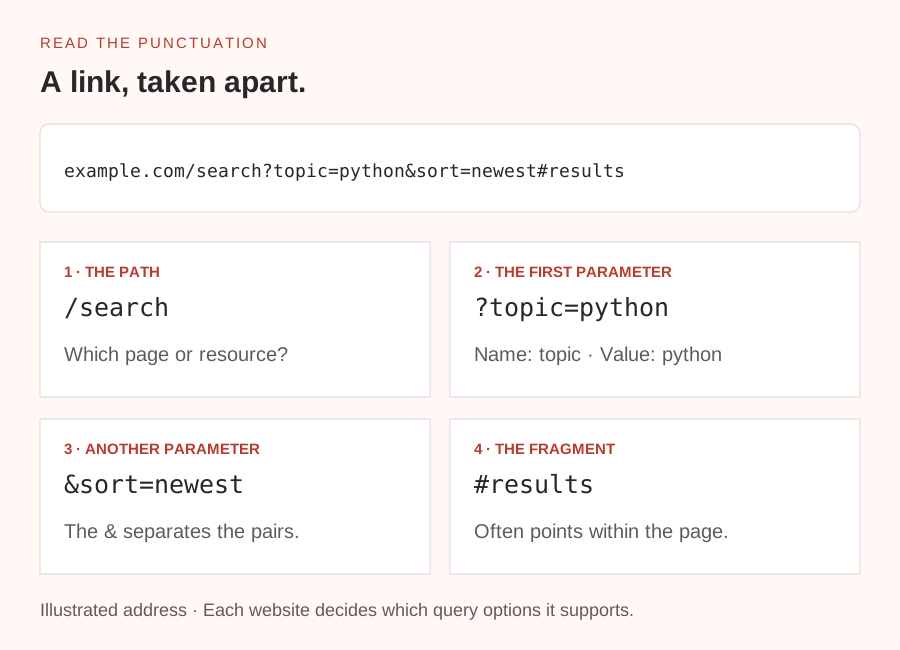
Read the link before you share it.
If a site stores filters in its URL, sharing that address can preserve your view for another reader. That’s why one link opens all products while another opens only the blue ones. Other sites keep these choices in the browser instead, so the link alone won’t reproduce them.
A fragment starts with a hash symbol, as in #results. It often points to a part of the page and is separate from the query string. You may also see encoded characters such as %20 for a space; links use encoding to represent characters safely.
Reading an address is useful even if you never write code. It gives you a clue about what a link will do. Don’t remove unfamiliar parameters from sign-in or payment links: some values are necessary for the link to work.
https://example.com/search?topic=python&sort=newest#resultsDecode a link in plain English.
- Read the fictional address above without opening it.
- Find the path, then identify the two query parameter names and their values.
- Explain what changing sort=newest to sort=oldest might request, if the site supported that value.
Which part names the page, and which parts describe the view?
A little nudge
Use the punctuation as landmarks: ? starts the query, & separates pairs, and # starts the fragment.
What to look for
Path: /search. Query parameters: topic is python and sort is newest. Fragment: results. The changed sort value might request oldest-first results, but the website decides whether that value is supported.
Take it one small step further
Look at the address bar after using search on a familiar website. Does it record your search? Observe it without changing or sharing private values.
The path identifies a resource; the query string can carry options for it.
Read more: MDN · URL query parameters ↗
No submission needed. This one is just for you.